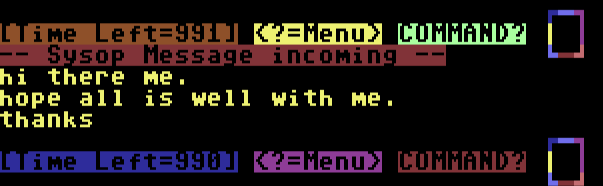
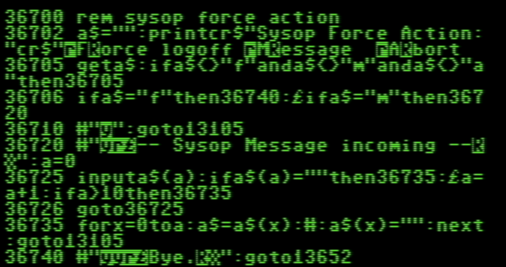
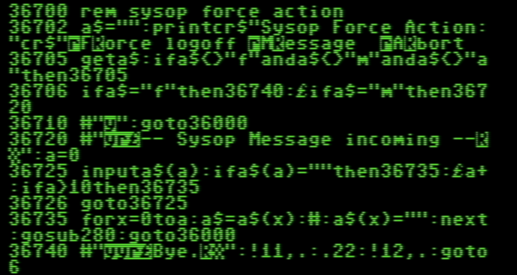
I found a neat mod in the 7.37 repositories that I implemented in my 8.1a BBS builds and it works nicely. Functional when the user is at the main command prompt.
Modifications for overlays. Primarily, these would go to bbs.msgs and bbs.xfer - although it could also be included with bbs.ovl:
Line 13126 must get modified to capture the “F7” key from local sysop console (ii=3)
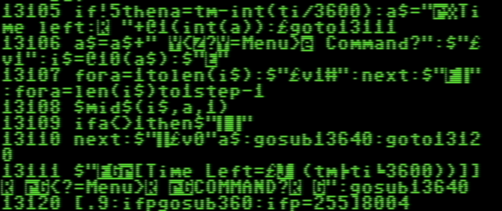
line 13105:
Checks user graphics capability setting. If it can’t take cursor movement graphics, then it jumps to line 13111 and just prints the normal prompt. Otherwise, it sets up a$ variable and goes to next line.
Line 13106:
Start of cursor animation. Builds further our a$, slows down speed, does a string format check (@10) to determine length of actual characters, moves that number of spaces to the left, then proceeds to print the string backwards with the last part of line 13107 & lines 13108-13110.
After the “NEXT” in 13110, it then prints the string foward at normal speed, prints the cursor box with the gosub13640, and jumps over line 13111 to be ready for user input.
thanks Nuke! with this code it works but i get the menu line twice. if i remove the a$ in 13110 i don’t get that but the box is on the left over the ? in <?=menu> (but still works just wrong location). but i’m realizing i don’t have 13105 in my code but doesn’t that just see if i have the capability and move forward? if it works then i don’t need that line? im putting in 13105 now to see if it makes any diff.
well that fixed it! 13105 i mean. i still do get one petscii character (the commodore and + key character) all the way on the left but it works otherwise!
thx man!
i will work on that update to the bbs over the next few days since it works on my test environment
Remember that a$ can hold whatever you want and this function will work. Play around with it. If you are getting extra characters as you mentioned, try something easy first - then add to it.
a$=“enter thy command master:”
then after you see that work you can add color functions or whatnot…